
Every time you round a float, an accountant somewhere feels a disturbance in the force.
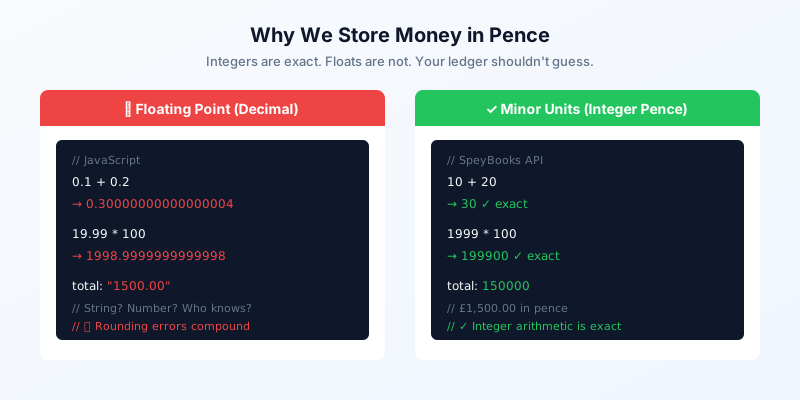
If you’ve ever built a billing system, you know the horror of 0.1 + 0.2 !== 0.3. JavaScript doesn’t lie — it just uses IEEE 754 floating-point, which can’t represent most decimal fractions exactly. That’s fine for physics simulations. It’s catastrophic for financial records.
The Problem in Three Lines
0.1 + 0.2
// → 0.30000000000000004

19.99 * 100
// → 1998.9999999999998

(0.1 + 0.2) === 0.3
// → false
These aren’t bugs. This is how binary floating-point works. The number 0.1 cannot be represented exactly in base 2, just as 1/3 cannot be represented exactly in base 10. Every operation on a decimal amount introduces a tiny error. Over thousands of transactions, those tiny errors compound into real discrepancies.
You don’t want to explain to HMRC that your VAT return is off by 3p because of a rounding artefact.
The Solution: Minor Units
Store monetary amounts as integers in the smallest currency unit. For GBP, that’s pence. For USD, cents. For JPY, yen (already whole numbers).
£1,500.00  →  150000   (integer pence)
£50.00     →  5000     (integer pence)
£0.01      →  1        (integer pence)
Integer arithmetic is exact. 10 + 20 = 30. Always. No rounding, no precision loss, no surprises.
This isn’t a SpeyBooks invention. Stripe does it. Shopify does it. Every serious payment platform does it. The pattern works because it eliminates an entire class of bugs at the representation level.
How SpeyBooks Uses Minor Units
Every monetary amount in the SpeyBooks API is an integer in pence:
{
  "success": true,
  "data": {
    "id": "inv_42",
    "invoiceNumber": "INV-2026-0001",
    "subtotal": 500000,
    "vatAmount": 100000,
    "total": 600000,
    "amountPaid": 0
  }
}
That’s an invoice for £5,000.00 plus £1,000.00 VAT, totalling £6,000.00. No decimal points. No string amounts. No ambiguity about whether "1500.00" is a string or a number.
The conversion happens at the boundary: pence in the API and database, pounds in the UI. One transformation layer, applied consistently.
The Conversion Layer
Converting between display format and storage format is straightforward:
// Pounds to pence (for storage)
function toPence(pounds: number): number {
  return Math.round(pounds * 100);
}

// Pence to pounds (for display)
function toPounds(pence: number): string {
  return (pence / 100).toFixed(2);
}

// Format for users
function formatGBP(pence: number): string {
  return new Intl.NumberFormat('en-GB', {
    style: 'currency',
    currency: 'GBP',
  }).format(pence / 100);
}

formatGBP(150000);  // "£1,500.00"
formatGBP(8900);    // "£89.00"
formatGBP(1);       // "£0.01"
The Math.round() in toPence handles the edge case where user input might arrive as a float. Once it’s an integer, it stays exact through every subsequent operation.
What About the Database?
In PostgreSQL, we store amounts as DECIMAL(12,2) internally but transform them to integer pence at the API boundary. This gives us the best of both worlds: the database stores human-readable values for direct SQL queries, while the API exposes machine-safe integers.
-- Database stores decimal
SELECT total FROM invoices WHERE id = 42;
-- → 1500.00

-- API transforms to minor units
-- → 150000
The transformation happens in a single library file (api-amounts.ts). Every route uses the same functions. No ad-hoc conversions scattered through the codebase.
VAT Calculations
VAT is where floating-point causes the most trouble. The standard rate is 20%, but applying it to arbitrary amounts produces fractional pence that need rounding:
// Line item: £49.99 plus 20% VAT
const netPence = 4999;
const vatPence = Math.round(netPence * 0.20);  // 1000 (not 999.8)
const grossPence = netPence + vatPence;         // 5999

// £49.99 + £10.00 VAT = £59.99
The Math.round() call is deliberate and consistent. HMRC accepts penny rounding on line items, and applying the same rounding rule everywhere means your VAT return reconciles cleanly.
For a deeper look at VAT handling, see VAT Schemes Explained (With Code).
Common Mistakes to Avoid
Don’t store money as strings. You’ll end up parsing "1,500.00" differently from "1500.00" and "1500". Strings invite format ambiguity. Integers don’t.
Don’t use floats for intermediate calculations. Even if you convert to integers for storage, doing arithmetic in floating-point and then rounding introduces the same errors you’re trying to avoid.
Don’t mix representations. If your API returns { total: 150000 } for invoices but { balance: "1500.00" } for accounts, someone will misinterpret one of them. Pick a format and apply it everywhere.
Do document the format. Make it explicit in your API documentation that amounts are in minor units. Stripe calls it out prominently and so should you.
The Broader Principle
Minor units aren’t about being clever — they’re about eliminating a source of bugs at the data layer. The same principle applies elsewhere in system design: use the representation that makes invalid states unrepresentable.
Integers can’t have rounding errors. Prefixed IDs can’t be confused across entity types. Double-entry transactions can’t be unbalanced. Each constraint removes an entire category of bugs.
- Floating-point can't represent most decimal fractions exactly — errors compound across transactions
- Store all monetary amounts as integers in the smallest currency unit (pence for GBP)
- Convert at the boundary: pence in the API and database, pounds in the UI
- Use consistent rounding (Math.round) for VAT calculations
- This is the industry standard — Stripe, Shopify, and every serious payment platform uses minor units