
Every competing accounting platform puts “Connect your bank” on the first screen after signup. It’s treated as a feature. A convenience. A checkbox on comparison tables.
We don’t offer it. Not because we can’t build it, but because we think the trade-off is wrong for the people we serve.
How Bank Feeds Actually Work
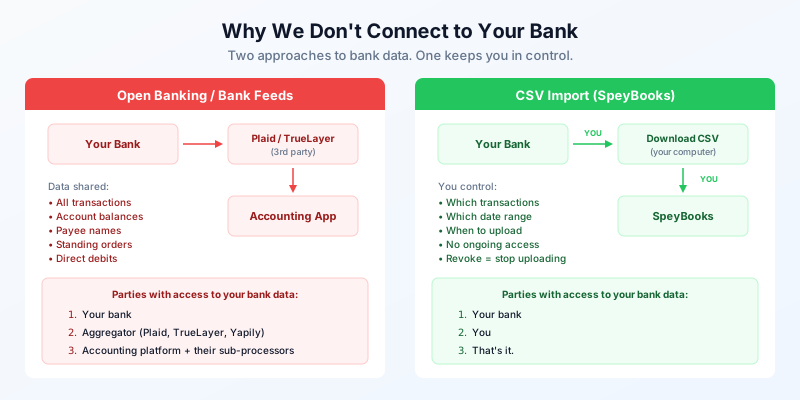
When you “connect your bank” in most accounting software, here’s what happens at the protocol level:
- The accounting platform redirects you to an Open Banking aggregator — Plaid, TrueLayer, Yapily, or similar
- You authenticate with your bank through the aggregator’s interface
- The aggregator establishes a persistent connection to your bank account
- Transaction data flows from your bank → aggregator → accounting platform
- This connection refreshes automatically, typically every few hours
The key word is persistent. Once connected, the aggregator pulls your transactions continuously until you explicitly revoke access. Some connections require re-authentication every 90 days under PSD2; others are refreshed without explicit user interaction.
The data that flows through this pipe includes: every transaction, account balances, payee names, standing orders, direct debits, and in some implementations, account holder details.
The Third-Party Problem
Count the parties with access to your financial data in a typical bank feed setup:
- Your bank — obviously
- The aggregator (Plaid, TrueLayer, etc.) — they see everything that flows through their pipe
- The accounting platform — they store the transactions
- The platform’s sub-processors — cloud providers, analytics tools, support platforms
Each party has its own privacy policy, its own data retention rules, its own security posture, and its own jurisdiction. Plaid, for example, is a US company. Your UK bank transaction data transits through their infrastructure.
In January 2024, Plaid agreed to a $58 million class-action settlement related to allegations that it collected more financial data than some users expected. The case centred on their consent flow and the scope of data accessed. Regardless of the merits, it illustrates the complexity: when you grant access to a financial intermediary, the boundaries of that access aren’t always clear.
What CSV Import Looks Like
SpeyBooks uses CSV import for bank reconciliation. Here’s the flow:
- You log into your bank’s website
- You download a CSV of your transactions for a date range you choose
- You upload that CSV to SpeyBooks
- SpeyBooks parses the transactions and matches them against your ledger
The parties with access to your data:
- Your bank
- You
- SpeyBooks — only for the data you upload
No aggregator. No persistent connection. No background data pulls. You control exactly which transactions are shared, for which date range, and when. “Revoking access” means you stop uploading files.
# SpeyBooks API — upload bank statement
curl -X POST https://api.speybooks.com/v1/bank-imports \
  -H "Authorization: Bearer sk_live_..." \
  -F "file=@barclays-feb-2026.csv" \
  -F "bankAccountId=acc_1200" \
  -F "format=barclays"
The API accepts CSV files from all major UK banks. The parser handles the different column formats — Barclays, HSBC, Lloyds, NatWest, Starling, Monzo, and others. You can also upload OFX/QIF if your bank provides those.
The Convenience Trade-Off
The honest trade-off: CSV import is less convenient than automatic bank feeds. You have to download a file and upload it. That’s friction.
But consider what you’re trading for that convenience:
| Bank Feeds | CSV Import | |
|---|---|---|
| Setup | Authorise via aggregator | Download a file |
| Frequency | Automatic, every few hours | When you upload |
| Data shared | All transactions, ongoing | Selected transactions, per upload |
| Third parties | Aggregator + their infra | None |
| Revocation | Find setting, revoke token | Stop uploading |
| Jurisdiction | Varies (often US) | Your machine + SpeyBooks (UK) |
For a developer running a limited company with one bank account and 20–50 transactions a month, downloading a CSV once a month takes about 90 seconds. The reconciliation itself takes the same amount of time regardless of how the data arrived.
We think 90 seconds of your time is a reasonable exchange for keeping your bank data out of third-party infrastructure.
The Reconciliation Workflow
CSV import doesn’t mean manual data entry. Once the transactions are in SpeyBooks, the reconciliation process is the same as it would be with a bank feed:
- Auto-matching: SpeyBooks matches bank transactions to existing invoices and expenses by amount, date, and reference
- Categorisation rules: define rules like “AWS” → Hosting expense, and they apply automatically on future imports
- Bulk actions: confirm multiple matches at once, or create new transactions from unmatched rows
{
  "success": true,
  "data": {
    "imported": 47,
    "autoMatched": 31,
    "needsReview": 16,
    "duplicatesSkipped": 0
  }
}
The autoMatched figure improves over time as your categorisation rules build up. After a few months, most imports are mostly automatic — you’re reviewing exceptions, not processing every row.
When We Might Add It
We’re not ideologically opposed to Open Banking. If enough users request it, we’ll add it as an opt-in feature with clear documentation about what data flows where.
The difference is in the default. Most platforms make bank feeds the primary path and bury CSV import somewhere in settings. We make CSV import the primary path and would offer bank feeds as an explicit choice for users who understand the trade-off and prefer the convenience.
If we do add it, we’ll publish exactly which aggregator we use, what data they access, where it’s stored, and how to revoke access — in plain language, not buried in a privacy policy.
For now, CSV import covers the use case well for the UK sole traders and limited companies we serve. The extra 90 seconds buys you something valuable: knowing exactly who has your financial data.
The Broader Philosophy
This is part of a wider design philosophy at SpeyBooks. We don’t use tracking cookies or third-party analytics. We store all data in the UK. We document our sub-processors publicly.
The principle is simple: minimise the number of parties that touch your data. Every additional third party is a surface area for breaches, policy changes, acquisitions, and jurisdictional complexity. The fewer parties involved, the easier it is to answer the question: “Who has my data?”
With SpeyBooks, the answer is short.
- Open Banking gives aggregators persistent access to all your transactions — not just the ones you're importing
- CSV import puts you in control: you choose which data, which date range, and when to share it
- The convenience trade-off is about 90 seconds per month for a typical small business
- SpeyBooks auto-matches imported transactions and learns from your categorisation rules
- If we add bank feeds in future, it'll be opt-in with full transparency about data flows