
VAT is one of those topics where the official guidance creates more confusion than it resolves. HMRC’s documentation is thorough but assumes you already understand the terminology. Developer documentation about VAT is rare, and most of it is wrong about the edge cases.
Here’s what you actually need to know to implement VAT correctly in software, covering the three main schemes available to UK businesses.
The Basics: What VAT Is
VAT (Value Added Tax) is a consumption tax. Businesses charge VAT on sales (output tax) and reclaim VAT on purchases (input tax). The difference is what you pay to HMRC.
VAT to pay = Output VAT (charged on sales) − Input VAT (paid on purchases)
If you charge more VAT than you pay, you owe HMRC the difference. If you pay more than you charge (common for exporters), HMRC refunds you.
The standard rate is 20%. Reduced rate is 5% (home energy, children’s car seats). Zero rate is 0% (food, books, children’s clothing). Exempt means VAT doesn’t apply at all (financial services, education).
For a software developer invoicing consultancy fees, almost everything is standard rate.
Scheme 1: Standard VAT Accounting
The default scheme. Most VAT-registered businesses use this.
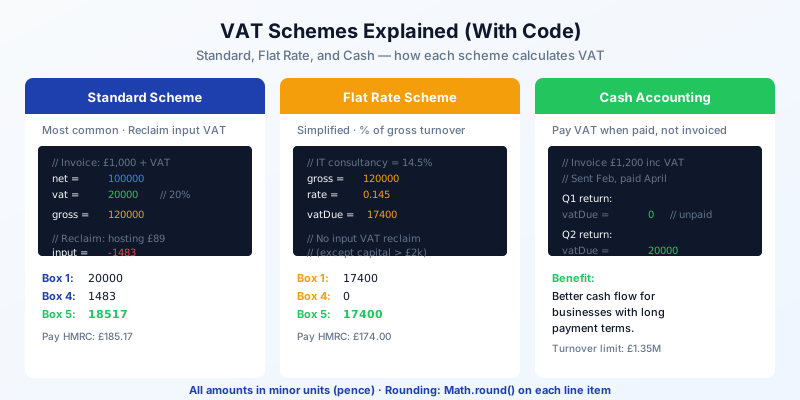
How it works: you account for VAT based on invoice dates, regardless of when payment is received. If you issue a £1,200 invoice (including £200 VAT) in January but don’t get paid until March, the £200 VAT is due on the January quarter.
Calculation:
// Invoice to a client
const netPence = 100000;     // £1,000.00
const vatRate = 0.20;         // Standard rate
const vatPence = Math.round(netPence * vatRate);  // 20000 (£200.00)
const grossPence = netPence + vatPence;            // 120000 (£1,200.00)

// Expense: hosting £89.00 inc VAT
const expenseGross = 8900;
const expenseVat = Math.round(expenseGross - (expenseGross / 1.2));  // 1483
const expenseNet = expenseGross - expenseVat;  // 7417

// VAT return
const box1 = vatPence;         // 20000 — VAT on sales
const box4 = expenseVat;       // 1483  — VAT reclaimed
const box5 = box1 - box4;      // 18517 — Net VAT due (£185.17)
Key point: Math.round() on every line item calculation, not on the totals. HMRC accepts penny rounding at the line item level. Rounding at the end produces different results and causes reconciliation headaches.
Who should use it: businesses with significant input VAT to reclaim (equipment purchases, office costs, stock). Most limited companies start here.
Scheme 2: Flat Rate Scheme
A simplified scheme where you pay a fixed percentage of your gross (VAT-inclusive) turnover.
How it works: instead of tracking input and output VAT separately, you apply a flat percentage to your gross revenue. The percentage depends on your business type. You still charge 20% VAT on invoices, but you keep the difference between what you charge and what you pay HMRC.
Flat Rate percentages (selected categories):
| Business Type | Flat Rate |
|---|---|
| Computer and IT consultancy | 14.5% |
| Management consultancy | 14% |
| Advertising | 11% |
| Architect, civil and structural engineer | 14.5% |
| Accounting and bookkeeping | 14.5% |
| Photography | 11% |
First-year discount: subtract 1% in your first year of VAT registration.
Calculation:
// Invoice £1,000 + 20% VAT = £1,200 gross
const grossPence = 120000;
const flatRate = 0.145;  // IT consultancy

const vatDuePence = Math.round(grossPence * flatRate);  // 17400 (£174.00)

// You charged £200 VAT but pay £174 to HMRC
// The £26 difference is yours to keep (taxable profit)

// VAT return
const box1 = vatDuePence;  // 17400
const box4 = 0;            // No input VAT reclaim (with exceptions)
const box5 = vatDuePence;  // 17400
const box6 = Math.floor(grossPence / 100);  // 1200 (whole pounds, inc VAT)
The catch: you generally can’t reclaim input VAT on purchases. The exception is capital goods over £2,000 including VAT — those can be reclaimed separately.
Who should use it: sole traders and small companies with low expenses. If your input VAT is small relative to your turnover, the flat rate scheme saves you both money and paperwork. Software consultants with few overheads often benefit.
Eligibility: VAT-exclusive turnover must be £150,000 or less to join. You must leave if it exceeds £230,000.
Scheme 3: Cash Accounting
How it works: you account for VAT based on payment dates, not invoice dates. If you invoice in January but get paid in March, the VAT goes on the March quarter.
Calculation:
// Invoice sent: February (Q1: Jan–Mar)
// Payment received: April (Q2: Apr–Jun)

const invoiceVat = 20000;  // £200 VAT on a £1,000 invoice

// Q1 return: this invoice contributes £0 (unpaid)
const q1Box1 = 0;

// Q2 return: payment received, now count it
const q2Box1 = invoiceVat;  // 20000
The same principle applies to expenses: you reclaim input VAT when you pay the bill, not when you receive it.
Who should use it: businesses with long payment terms or clients who pay slowly. Cash accounting improves cash flow because you don’t pay VAT to HMRC on invoices that haven’t been paid yet.
Eligibility: VAT-exclusive turnover must be £1.35 million or less.
Can be combined with Standard or Flat Rate: cash accounting is about when you account for VAT. Standard and Flat Rate are about how much you pay. You can use Cash Accounting with Standard VAT (account for output and input VAT when cash changes hands) but you cannot combine Cash Accounting with Flat Rate — they’re mutually exclusive by HMRC rules.
Implementing VAT in Practice
Tax Codes
Map each VAT rate to a code your system understands:
const TAX_CODES = {
  T1: { rate: 0.20, label: 'Standard (20%)' },
  T2: { rate: 0.05, label: 'Reduced (5%)' },
  T0: { rate: 0.00, label: 'Zero Rated (0%)' },
  TX: { rate: 0.00, label: 'Exempt' },
  TN: { rate: 0.00, label: 'No VAT (not registered)' },
} as const;
Every transaction line item gets a tax code. This determines how it feeds into the VAT return. Zero-rated and exempt transactions still appear in Box 6 (total sales) — the difference is that zero-rated items appear in Box 1 as £0 VAT, while exempt items are excluded from the VAT calculation entirely.
Rounding Strategy
HMRC accepts per-line-item rounding. This means you calculate VAT on each line item independently and round to the nearest penny, then sum the rounded values:
function calculateVat(lines: LineItem[]): VatSummary {
  let totalNet = 0;
  let totalVat = 0;

  for (const line of lines) {
    const lineNet = line.quantity * line.unitPricePence;
    const lineVat = Math.round(lineNet * TAX_CODES[line.taxCode].rate);
    totalNet += lineNet;
    totalVat += lineVat;
  }

  return {
    netPence: totalNet,
    vatPence: totalVat,
    grossPence: totalNet + totalVat,
  };
}
This approach matches how HMRC expects figures to be derived. The alternative — summing all net values then applying VAT once — can produce different results by up to a few pence per invoice. Over a quarterly return with hundreds of invoices, those pennies add up.
The 9-Box Return
For a deeper look at the 9-box structure and HMRC’s submission API, see MTD for Developers: A Technical Guide.
Which Scheme Should You Recommend?
If you’re building accounting software, you need to support at least Standard and Flat Rate. Here’s the decision tree for your users:
Not VAT registered (turnover under £90,000 as of April 2024): no VAT to worry about. Monitor turnover and alert when approaching the threshold.
Standard scheme: sensible default. Suits most businesses, especially those with significant input VAT.
Flat Rate: suits sole traders and consultancies with low overheads. Run the numbers — if gross × flat_rate < output_vat - input_vat, the Flat Rate scheme saves money.
Cash Accounting: add this if your users have long payment cycles. It’s a cash flow optimisation, not a tax optimisation.
- Standard scheme: pay output VAT minus input VAT, based on invoice dates
- Flat Rate: pay a fixed percentage of gross turnover — simpler but no input VAT reclaim
- Cash Accounting: pay VAT when cash changes hands — better cash flow for slow payers
- Always round VAT per line item (Math.round), then sum — never round on the total
- Boxes 1–5 are in pence, Boxes 6–9 are in whole pounds — this catches out many implementations